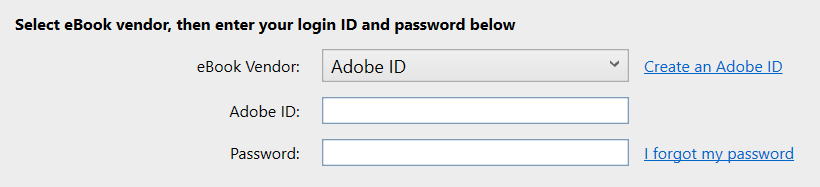
What is a ByteBooks ID?
A ByteBooks ID is a free account that allows you to download ebooks to Adobe Digital Editions software and supported ereaders.
You can create a ByteBooks ID on the ByteBooks website.
What if I already have an Adobe ID?
ByteBooks IDs replaced Adobe IDs on June 23, 2026. This is because Adobe's ebook platform is now managed by Wipro, owner of ByteBooks.
If you've already authorized Adobe Digital Editions or your ereader with an Adobe ID, you can continue using it. However, if you need to reauthorize or authorize a new device, you'll need to use a ByteBooks ID instead.
If you want to retain access to ebooks that you downloaded using your Adobe ID (e.g., purchased ebooks), make sure to create your ByteBooks ID using the same email address you used for your Adobe ID. If you no longer have access to that email address, contact Wipro/ByteBooks for support: ebooks-support@wipro.com.
Where do I enter my ByteBooks ID in Adobe Digital Editions?
In Adobe Digital Editions, select Help > Authorize Computer to open the "Computer Authorization" window. Then, select Adobe ID from the "eBook Vendor" dropdown and enter your ByteBooks credentials in the "Adobe ID" and "Password" fields.