How to return a Kindle Book borrowed from your library
Borrowed Kindle Books are automatically returned to your library at the end of their lending periods.
If you'd like to return a Kindle Book before your lending period ends, you can use these steps to return it on Amazon's website, on your Kindle ereader, or from the Kindle app.
Note: If you still see the returned book on your Loans page after following these steps, reload your browser.
Returning a library loan on Amazon's website
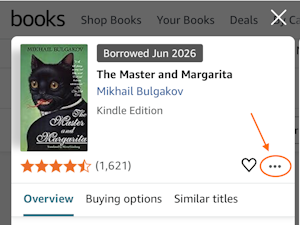
- On Amazon's website, go to the "Your Books" page and click or tap the cover image for the title.
- Select
 .
.
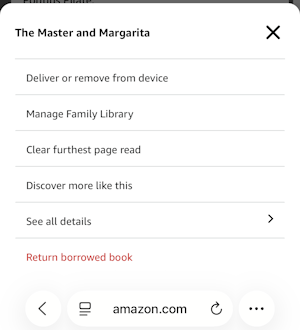
- Select Return borrowed book, then Return to confirm.
Returning a library loan on your Kindle ereader
- On your Kindle ereader, go to your "Home" or "Library" screen.
- Find the title, then tap the Menu
 button on the cover.
 - Tap Remove from Library (on newer devices) or Return to Public Library (on older devices), then confirm.
Returning a library loan from the Kindle app
- In the Kindle app, go to your "Home" or "Library" screen.
- Find the title, then tap and hold the cover until a menu appears.
- Tap Remove from Library, then confirm.
Note: On older devices, you may not see this option. If that's the case, please use one of the other return methods.
The returned Kindle Book may still appear on your Kindle device or reading app, but you won't be able to open it. Follow these steps to fully remove the title from your device.


